 VINYL BPM PREP APP · iOS
BPM-check your vinyl.
Save each track.
Mark your records.
レコードのBPMを測る。
曲ごとに保存する。
自分のやり方で残す。
A faster way to prep records before the gig.
Drop the needle, wait for READY TO SAVE, then build a BPM list you can use while marking your sleeves, stickers, or Post-its.
現場前に、レコードのBPMをまとめて確認するためのアプリ。
針を落として、READY TO SAVE を待って、曲ごとに保存。あとはスリーブ、シール、ポストイットに自分のやり方で残すだけ。
WHO IT'S FOR こんな人に
For vinyl DJs who prep records at home, in listening booths, or before a gig. 家で、レコード店の試聴台で、現場前に。レコードを自分で仕込むDJのために。
Not a streaming BPM lookup. Not a full collection database. Just a fast way to measure, save, and mark the records in front of you. ストリーミングのBPM検索でも、巨大なコレクション管理でもありません。目の前のレコードを測って、保存して、書き残すための道具です。
THE PROBLEM THE PROBLEM
Other BPM apps weren't built for this.
They flash a number and forget it.
Or save everything automatically — and your list turns to noise.
Or bury a simple task under too many taps.
You just want to work through a stack of records, one by one,
without the app getting in the way.
既存のBPMアプリは、このために作られていない。
数字が出るだけで、残らない。
全部自動保存されて、リストがすぐ混沌とする。
シンプルな作業なのに、タップが多すぎる。
やりたいのはただ、レコードを一枚ずつ、黙々と測っていくだけのことなのに。
THE ROUTINE ルーティン
Step 1 — Focus on the record in front of you. Step 1 — 目の前の一枚に集中する。
Drop the needle. Wait for READY TO SAVE. Tap SAVE for each track.
Repeat until the crate is done.
針を落とす。READY TO SAVE を待つ。曲ごとに SAVE。
クレートが終わるまで繰り返す。
Step 2 — Log your session. Step 2 — まとめて記録する。
Review the list. Keep what you need.
Then mark each record your way — sticker, marker, Post-it, pencil on the sleeve.
Whatever works for you.
測り終えたらリストを見返す。必要なものだけ残す。
あとは自分のやり方でレコードに書き留めるだけ。
シールでも、マジックでも、ポストイットでも。
FEATURES
● Get a usable BPM in seconds 数秒で使えるBPMへ
Drop the needle and the mic does the rest.
When the app says READY TO SAVE, keep the track and move on.
針を落とすだけ。マイクが残りをやる。
READY TO SAVE になったら保存して、次の曲へ。
● Tap it when the record is tricky 難しい曲はタップで補正
Prefer to tap it in yourself? Zero-latency design —
measurement starts the moment your finger hits the screen.
自分でタップして合わせたい時も。
ゼロ・レイテンシー設計で、画面に触れた瞬間に計測が始まる。
● Double-check by ear 耳で確認してから保存
Play clicks at the measured BPM to double-check your reading
or feel out the pitch before you save.
計測したBPMでクリックを鳴らして、
ピッチや体感を確かめてから保存できる。
● Keep each record together レコード単位でまとまる
One tap to save. Jacket photo, side labels, reorder undo,
and BPM range search keep the session usable.
ワンタップで保存。ジャケット、面番号、並べ替えUndo、BPM検索で、あとから見返しやすい。
SCREENS
HOW IT WORKS
Measure 計測する
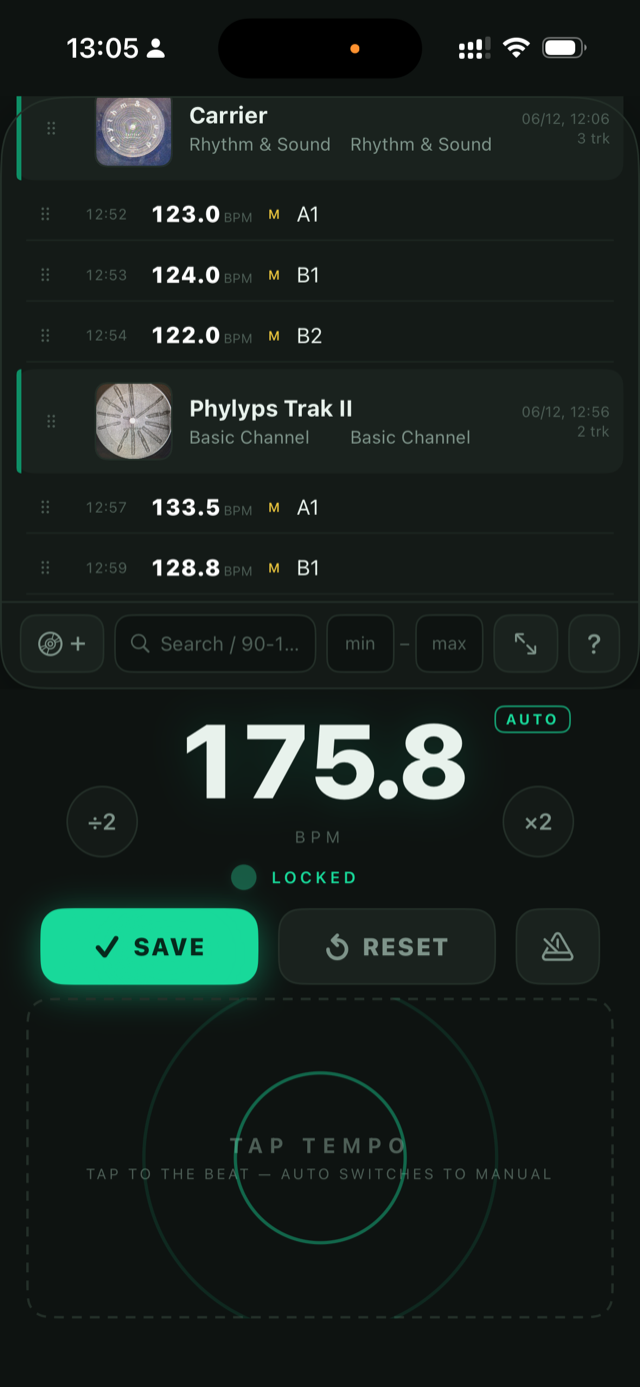
Drop the needle. When the dot goes green and the app says READY TO SAVE, the BPM is ready.
Or tap the lower zone to the beat for manual tempo.
針を落とす。ドットが緑になり READY TO SAVE と表示されたらBPM確定。
自分でタップして合わせたい時はタップゾーンを使う。
Save or skip 残すか、流すか
Hit ✓ SAVE to keep it. Don't need it? Just reset and move on.
Use ×2 ÷2 for half-time / double-time correction.
✓ SAVE で保存。不要なら RESET して次へ。
ハーフ/ダブルタイムは ×2 ÷2 で補正できる。
Build your list リストを育てる
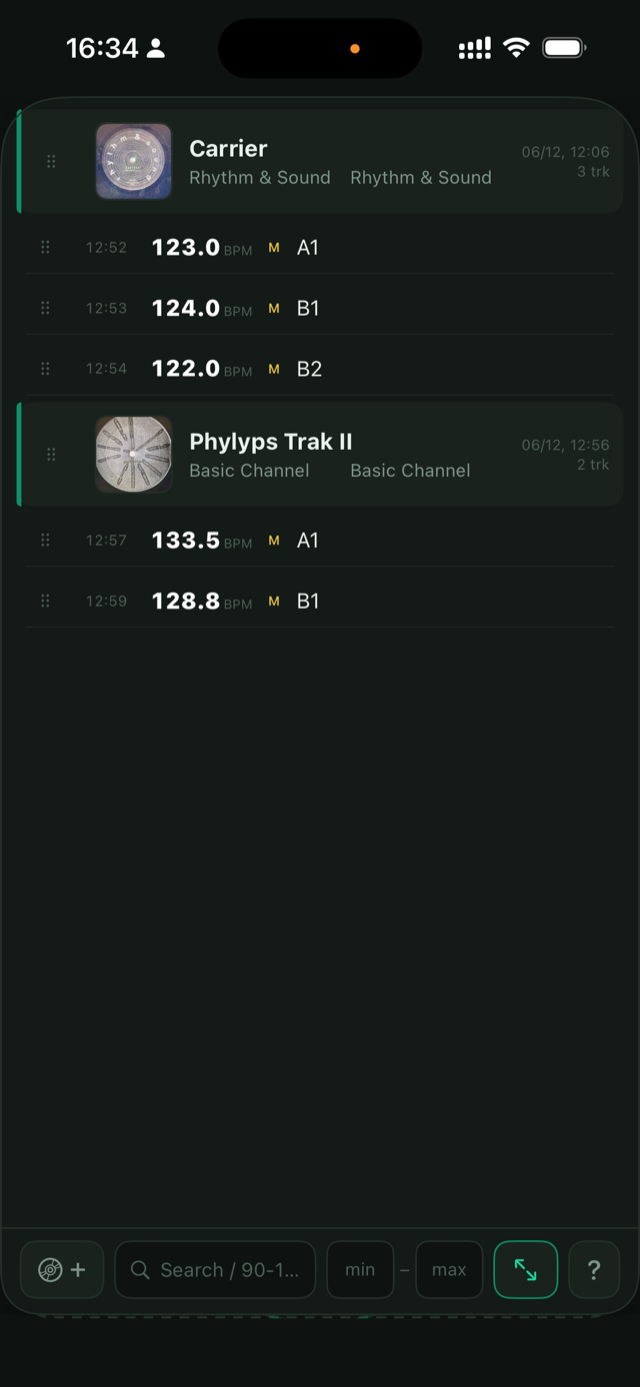
Add a jacket photo, edit titles inline, drag to reorder.
Your session log grows record by record.
ジャケット写真を追加、タイトルを直接編集、ドラッグで並べ替え。
一枚ずつ、セッションログが積み上がっていく。
Mark your records レコードに残す
When you're done measuring, use your list as reference.
Write the BPM on each record however you like —
sticker, marker, Post-it, or straight on the sleeve.
測り終えたら、リストを見ながら各レコードにBPMを書き留める。
シール、マジック、ポストイット、スリーブへの直書き。
やり方はあなたが決める。
FAQ
- What if the BPM feels wrong? BPMが違う気がするときは?
- Use ×2 / ÷2 for half-time or double-time readings, or tap manually when a record has sparse drums, unusual percussion, or a noisy intro. ハーフ/ダブルタイムに聞こえる場合は ×2 / ÷2 を使ってください。ドラムが少ない曲、変則的なパーカッション、ノイズの多いイントロでは手動タップも使えます。
- Is mic audio sent anywhere? マイクの音声はどこかに送信されますか?
- No. Audio is processed on-device in real time for BPM analysis only — never recorded, stored, or transmitted. See the privacy policy for details. いいえ。音声はBPM解析のためにその場で処理されるだけで、録音・保存・送信は一切行いません。詳しくはプライバシーポリシーをご覧ください。
- Does it work offline? オフラインで使えますか?
- Yes. All features work fully offline. Perfect for record store listening booths. はい。すべての機能がオフラインで動作します。レコード店の試聴台でもどうぞ。
- Where is my data stored? 記録したデータはどこに保存されますか?
- Everything is stored on your device only. No account required. すべて端末内にのみ保存されます。アカウント登録も不要です。
- Any ads or in-app purchases? 広告や課金はありますか?
- None. ありません。
- Can I export my session list? セッションのリストを書き出せますか?
-
Not yet — but you can use the catalog screen as a reference while marking your records.
Export is on the roadmap. 現時点では未対応です。計測後はカタログ画面を見ながらレコードにBPMを書き留めてください。
エクスポート機能はロードマップに入っています。